T H S P A
Texas High School Powerlifting Association
The Strongest Association in Texas
Skip Navigation Links
Home
I Am A...Expand I Am A...
AssociationExpand Association
DocumentsExpand Documents
Hall Of ChampionsExpand Hall Of Champions
SupportExpand Support
Sign In

Frequently Asked Questions


Questions

PowerScore How do I get a copy of PowerScore?
How do I download the PowerScore installation package?
How do I install PowerScore after I've downloaded the installation package?
PowerScore is asking for a registration key.  What do I do?
THSPA Website The dropdown menus on the THSPA website are invisible.  How do I fix it?

Answers

            PowerScore


  • How do I download the PowerScore installation package?

        When you click on the Download link, you will see the following dialog box:
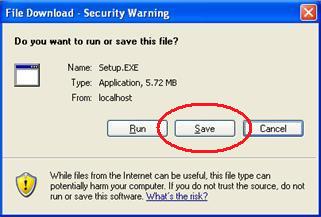
             

        Click Save.  Then you will get the following:
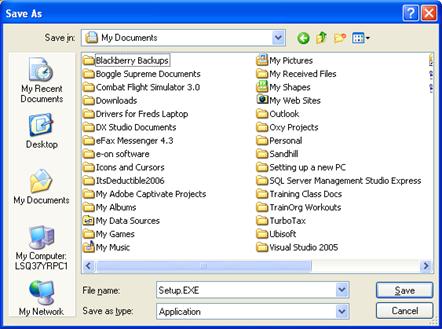
             

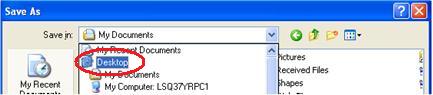
        Click the Save In drop-down box and navigate to, then click on Desktop.
             

        Lastly, click on the Save button.
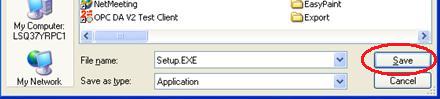
             

        The PowerScore installation file, Setup.exe, has now been saved to your Desktop.

  • How do I install PowerScore after I've downloaded the installation package?

         Go to your Desktop.


        On your Desktop, locate Setup.exe (assumes you followed the download instructions above).


        Double-click Setup.exe to begin the installation process.


        After the first installation screen comes up, simply click Next.  Continue clicking Next as each
        succeeding screen is displayed.


        Click Finish on the last screen to complete the installation.

        If Windows prompts you to restart your computer, do so.

        You should now have the PowerScore icon on your Desktop.


  • PowerScore is asking for a registration key. What do I do?

          Type BABVNZM8MIZL into the Registration Key box then click Register.


        If you've entered the correct registration key then you're ready to go..


        Otherwise call for help.


            THSPA Website

  • The dropdown menus on the THSPA website are invisible. How do I fix it?

        The issue? When you hover over the menus at the top of the page all you get is a blank dropdown.


        This is a known issue with Internet Explorer 8. The fix is easy.

       Click on Tools in the top-right corner of Internet Explorer, then click Compatibility View Settings


        Type thspa.us into the "Add this website" box (if it's not already there) then click Add.


        Make sure you see thspa.us in the "Websites..." box. Click Close.


        The page will automatically refresh, after which you should be able to view the dropdown menus normally.